Who it’s forIndependent Garages & Car Service Centres
Garage management software
Spend less time on paperwork and more time running your garage, with every job, booking and car’s history in one place, and clear notes on every invoice.
Roo, the AI assistant, helps with data entry: send him a voice message, a photo of a new customer’s form or a supplier’s invoice, and he puts it where it belongs.
Every job on one board
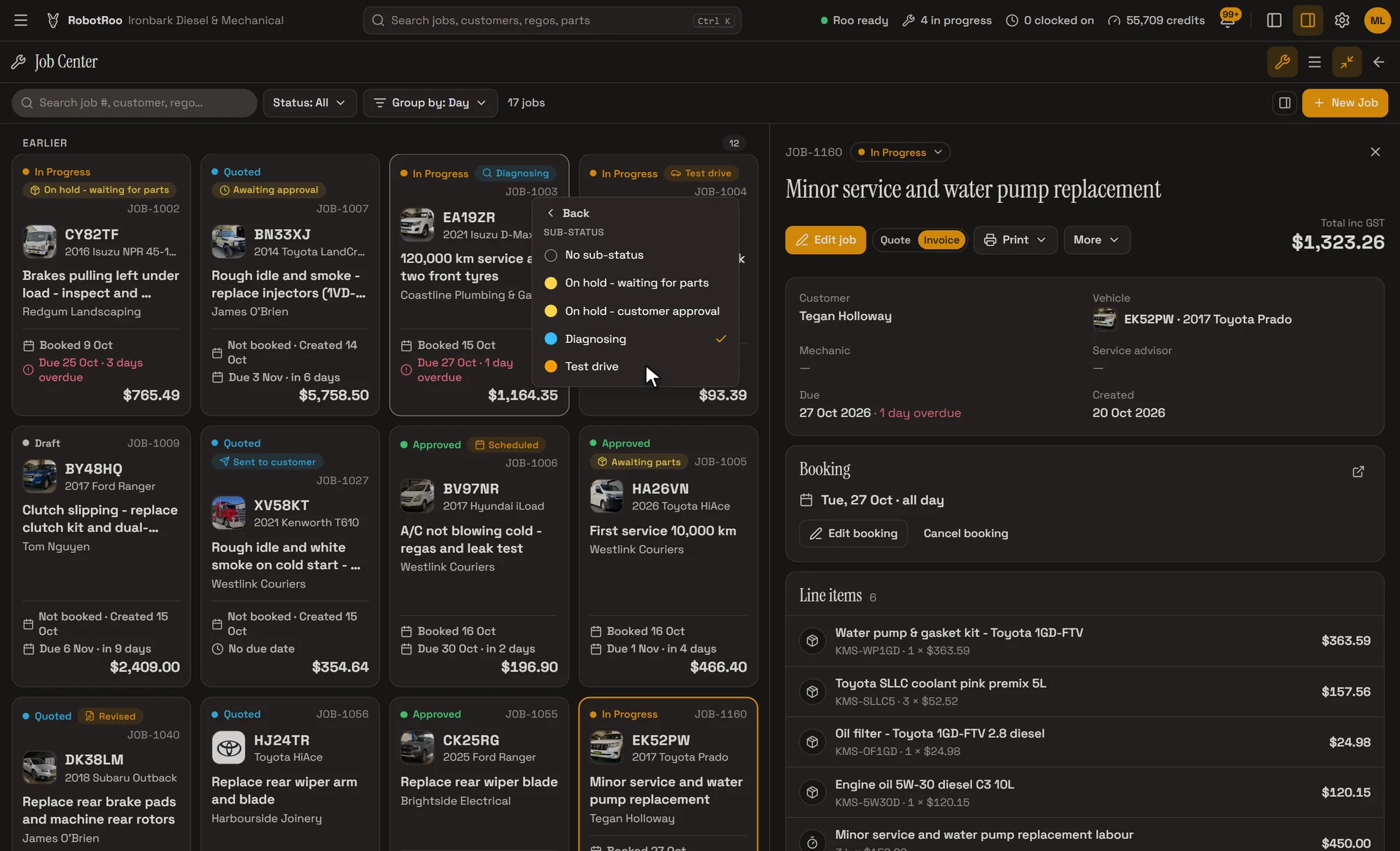
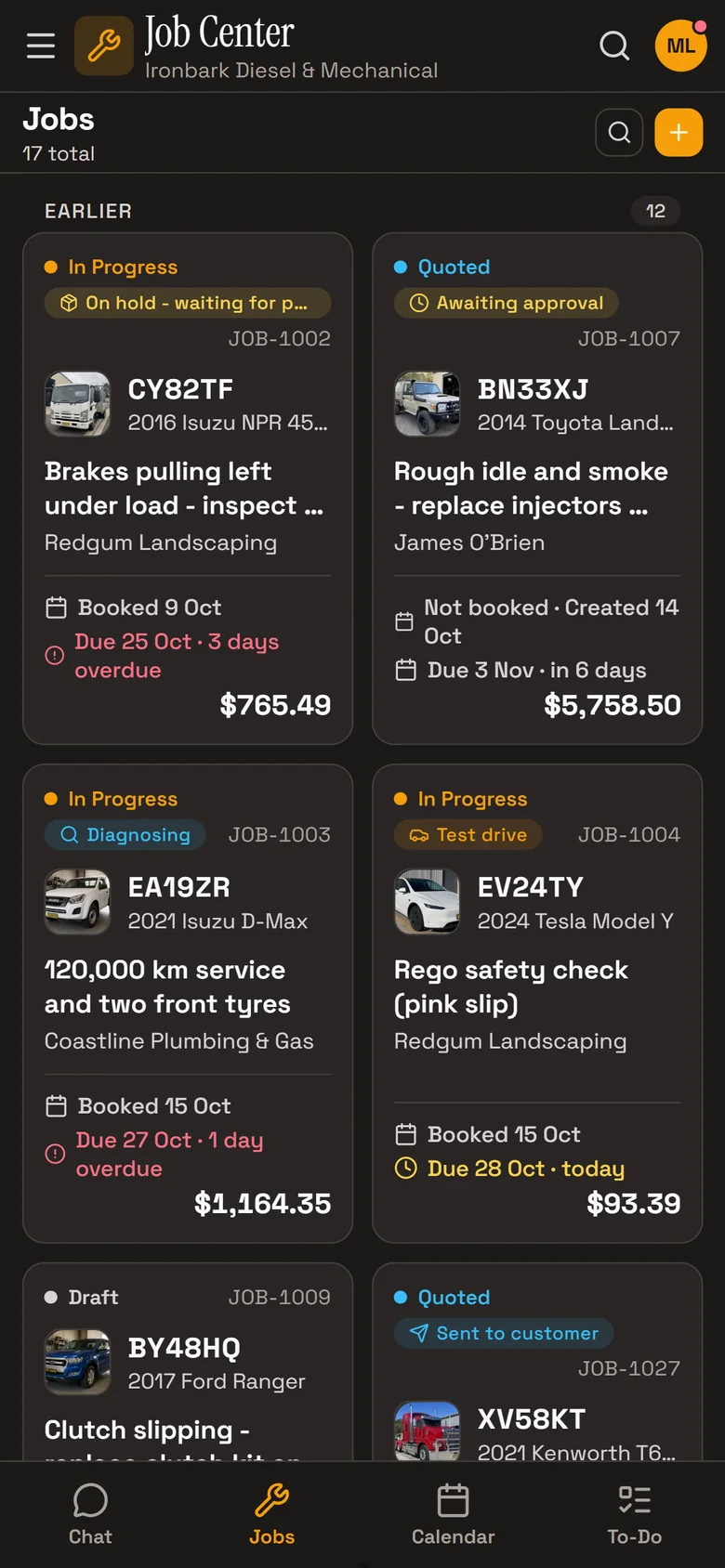
The Job Centre shows every job as a card with its vehicle, customer, status, booking and due dates and total. Group by day, filter by status, and open a job to see its parts, labour, notes and history.
- StatusesEach job moves through its status, with sub-statuses for where it’s up to.
- Booked and dueBooking and due dates on every card, so overdue jobs are easy to find.
- Each car’s historyEvery past job on the car’s record, and Roo answers from them with the job numbers.
Everyday servicing
Cars come in on the calendar, with the job, rego, customer and mechanic on each booking. When the job is finished, the car’s odometer and its next service are updated.
- BookingsDay, week and month views. Book from the job, the calendar or by asking Roo.
- Next serviceBy date or kilometres at the top of the car’s record, and the vehicle list filters to those due in the next 30 days.
- Clear invoicesRoo writes the invoice notes from the mechanic’s notes, and the invoice is emailed as a PDF.
New customers, less typing
Send Roo a photo of a new customer’s handwritten form and he adds the customer. Photos of the car, its VIN plate and odometer add the car to their account.
Or let new customers fill in a form themselves from your QR code, with photos of their car, and approve them.
- Photos to recordsThe rego, VIN, make, model and odometer from the photos, with the photos kept on the car.
- You approveSign-ups wait for you, and customers already on file with the same phone or email are flagged.
Day to day
People and businesses with their vehicles, contacts, jobs and pricing.
Send Roo a photo or PDF of a supplier’s invoice and he adds the parts to the job, priced with your markup.
Roo writes the notes on the quote or invoice from your mechanics’ notes, and you email it as a PDF.
Roo searches the web for recalls, known issues, procedures and labour times for the job, with a link to every source.
Sales, money owed and how the workshop is going, emailed on a schedule if you like.
Invoices, payments and credit notes go to your Xero account.
Ask Roo
Ask me in plain words. I’ll set up a new customer from their form, book a car in, tell you what was done on it last or who owes you money.
Things to ask
- Here’s a new customer’s form (with a photo)
- Book the Prado in for Tuesday at 8
- What have we done on EK52PW?
- Which jobs are overdue?
- Who owes us money?
Questions
Does it show when a car is due for a service?
Yes. The next service date and kilometres show on each car’s record, and the vehicle list can be filtered to those due in the next 30 days.
Does it look up recalls?
Yes. A job’s Research tab looks for recalls, including Australian recalls, with a link to each source.
Does it work on a phone?
Yes. RobotRoo works on a computer and on a phone, and Roo is in both.
Can my whole team use it?
Yes. Each person has their own login, and permissions are set by role, for example who can view, add, edit or delete customers.
Can I bring my data across?
Tell us what software you use when you register interest. We’ll assess how to bring your data across.